
Last updated on
Oct 31, 2026
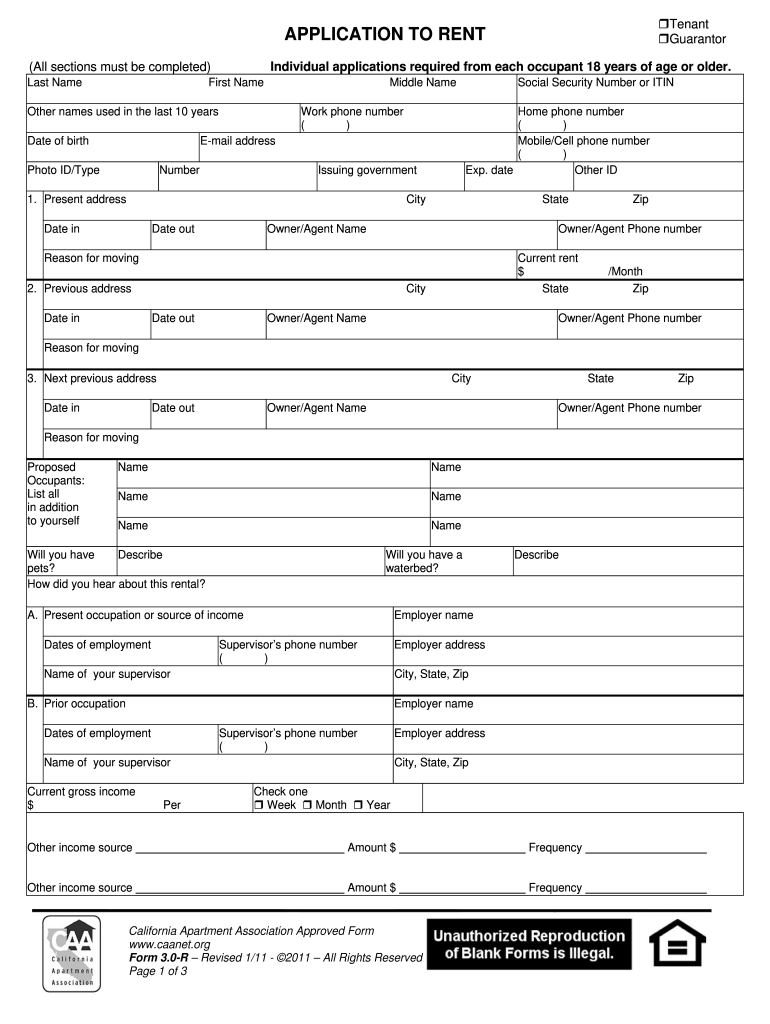
CA Form 3.0-R 2011-2026 free printable template
pdfFiller is not affiliated with any government organization

Fill out
Complete the form online in a simple drag-and-drop editor.

eSign
Add your legally binding signature or send the form for signing.

Share
Share the form via a link, letting anyone fill it out from any device.

Export
Download, print, email, or move the form to your cloud storage.
Why pdfFiller is the best tool for your documents and forms


End-to-end document management
From editing and signing to collaboration and tracking, pdfFiller has everything you need to get your documents done quickly and efficiently.
Accessible from anywhere
pdfFiller is fully cloud-based. This means you can edit, sign, and share documents from anywhere using your computer, smartphone, or tablet.
Secure and compliant
pdfFiller lets you securely manage documents following global laws like ESIGN, CCPA, and GDPR. It's also HIPAA and SOC 2 compliant.
What is CA Form 3.0-R
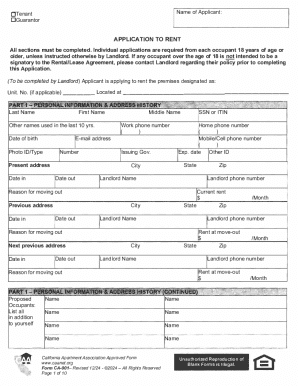
The California Rental Application Form is a document used by individuals applying to rent residential properties in California to provide essential personal and financial information.
pdfFiller scores top ratings on review platforms




Works Great, better then printing, scanning, running to print store.
Gets the job/writing/signatures done. Many functions and buttons.
Program easy to use and the support is easy to access with fast response!
I really enjoy that you can take care of all my document needs on this one site
great. easy to use. convenient. would recommend.
Thanks for the help, PDF filler was easy to use.
Who needs CA Form 3.0-R?
Explore how professionals across industries use pdfFiller.

CA Form 3.0-R is needed by:
-
Potential tenants seeking rental properties in California
-
Landlords and property managers processing rental applications
-
Real estate agents assisting clients with rental applications
-
Property management companies conducting tenant screenings
-
Individuals needing to establish rental history for future leases
Comprehensive Guide to CA Form 3.0-R
What is the California Rental Application Form?
The California rental application form is a vital document used during residential rental transactions in California. This form serves as an official request for prospective tenants to provide essential personal and financial information to landlords. Submitting a tenant application form is crucial for individuals seeking to rent a property, as it allows landlords to evaluate applicants effectively.
Purpose and Benefits of the California Rental Application Form
The California rental application form plays an essential role for both applicants and landlords. It streamlines the tenant screening process, making it easier for landlords to assess multiple candidates efficiently. For applicants, the form allows them to present their qualifications comprehensively, ensuring that they comply with relevant rental laws and regulations.
Key Features of the California Rental Application Form
Key components of the California rental application form include:
-
Required personal information: name, date of birth, and identification details.
-
Financial details: income, assets, and employment history.
-
Sections for references, previous addresses, and authorizations for background checks.
-
Signature line to verify the accuracy of the provided information.
These features help ensure that all required information is included for a thorough evaluation.
Eligibility Criteria for the California Rental Application Form
Eligibility to complete the California rental application form typically includes:
-
Individuals over the age of 18 must fill out their application.
-
Co-signers may be necessary for certain applicants with limited credit history.
-
Accuracy and honesty in the provided information are essential to avoid delays.
Ensuring compliance with these criteria can enhance an applicant’s chances of approval.
How to Fill Out the California Rental Application Form Online
To complete the California rental application form online, follow these steps:
-
Gather necessary documents, including identification and proof of income.
-
Open the form using a designated PDF editor that allows for fillable fields.
-
Carefully navigate and input information into each required field.
-
Review the form for accuracy before submitting it electronically.
Submitting the completed application ensures that landlords receive all the required information for processing.
Common Errors and How to Avoid Them
When filling out the California rental application form, applicants should be aware of common mistakes, such as:
-
Providing inaccurate or incomplete personal and financial information.
-
Failing to check signatures and dates for validity.
-
Overlooking sections that require additional documentation.
Double-checking the form before submission can significantly reduce the risk of errors.
Submission Methods and Delivery of the California Rental Application Form
There are several methods for submitting the completed California rental application form:
-
Electronic submission via email for quick processing.
-
Physical delivery to the landlord's office, if required.
-
Expect timely updates regarding your application status after submission.
Understanding the submission methods will help in adhering to the timelines associated with processing applications.
Security and Compliance for the California Rental Application Form
Protecting personal information is crucial during the application process. The California rental application form complies with relevant data protection legislation, ensuring user data is secure through:
-
256-bit encryption to safeguard sensitive information.
-
Compliance with HIPAA and GDPR standards for data privacy.
Utilizing reliable platforms for submitting forms enhances the overall security of personal data.
How pdfFiller Helps You with the California Rental Application Form
pdfFiller offers several advantages for completing the California rental application form, including:
-
Tools to edit, eSign, and finalize documents securely and easily.
-
A user-friendly interface accessible through any browser, eliminating the need for downloads.
-
Comprehensive customer support options to assist users throughout the process.
These features make pdfFiller an efficient choice for managing rental applications and other forms.
Experience Effortless Form Filling with pdfFiller
pdfFiller invites users to enjoy a seamless experience with the California rental application form. The platform provides easy navigation, robust security, and efficient storage options for completed documents. Explore pdfFiller to not only complete your rental application but also to discover an array of other PDF-related services available.
How to fill out the CA Form 3.0-R
-
1.Access the California Rental Application Form on pdfFiller by navigating to the designated URL or searching for the form within the platform.
-
2.Once the form is open, familiarize yourself with the layout and available fields, ensuring you understand where to input your information.
-
3.Gather all necessary information prior to starting the form completion. This includes your full name, social security number, employment details, income, previous addresses, and references.
-
4.Proceed to fill in each field methodically, starting with your personal details such as 'Last Name,' 'First Name,' and 'Date of Birth.'
-
5.Complete the employment and financial sections accurately, ensuring all information aligns with the documents you may use to verify your details.
-
6.Use checkboxes where applicable, and ensure to provide necessary signatures where indicated, especially for authorizations for background checks.
-
7.After filling out all sections, review the form carefully to ensure no fields are left blank and all information is accurate.
-
8.Once satisfied, finalize the form by saving your changes, downloading the completed application, or submitting it directly through pdfFiller as required.

Who is eligible to submit the California Rental Application Form?
Any individual who wishes to rent residential property in California can submit the California Rental Application Form. It is essential to provide accurate personal and financial information.
Are there any deadlines for submitting the rental application?
While the application itself does not have a strict deadline, it is advisable to submit it as soon as possible to secure the desired rental property, as applications are typically processed on a first-come, first-served basis.
What methods can I use to submit the completed rental application?
You can submit the completed California Rental Application Form electronically via pdfFiller, or you may download and print it to hand it directly to the landlord or property management company.
What supporting documents do I need to provide with my application?
It is common to provide supporting documents such as a photo ID, proof of income, and references along with the California Rental Application Form. Check with your landlord for any specific requirements.
What are some common mistakes to avoid when filling out the application?
Common mistakes include leaving fields blank, providing inaccurate information, or failing to sign the application. Make sure to double-check all details before submission.
How long does it take to process the California Rental Application?
Processing times vary, but landlords typically review applications within a few days. Factors like the completeness of forms and availability of background check results can influence the timeline.
Is there a fee to submit the rental application?
Fees may vary depending on the property or landlord. Some landlords charge an application fee to cover screening costs. Always check beforehand to ensure you understand any potential fees.
Related Forms


Related Catalogs
Get the latest insights from our blog


If you believe that this page should be taken down, please follow our DMCA take down process
here
.
This form may include fields for payment information. Data entered in these fields is not covered by PCI DSS compliance.